A Tuesday
Nothing here is a roadmap item.
Every line below is in the build today.
- 8:40 AM
- You open the Mac. Today already has the day on it: your meetings, the mail that actually needs you, and the things you asked it to watch.
- 9:15 AM
- Standup. You press record. Your microphone and the room audio both go in, the transcript is built on this machine, and the audio never leaves it. Afterwards you ask for what you agreed to and get it back with who said it.
- 11:00 AM
- You are stuck on a config file in another window. You ask what is wrong with it. Grux reads the window you are actually in, so you do not paste a screenshot and describe it.
- 1:30 PM
- A vendor mail needs a reply, a date and somebody's number. Mail, Calendar and Contacts each open as a pane beside the panel, pointed at your real accounts, so that is one turn instead of three apps.
- 3:00 PM
- You want a script run. It writes it, then stops. Anything that reaches the network, deletes a file or spends money lands in Approvals and waits for you to press the button.
- 5:40 PM
- You ask what you actually did today. Focus log has it, because it was watching your window titles and sending them nowhere.
Why
Five things you already pay for.
A chat window that cannot see your screen. A notetaker that dials into your call and uploads the audio to a stranger. An inbox assistant you have to forward your mail to. A research tool with its own tab. And a terminal you keep pasting half of into one of the other four.
Grux is all five, in one panel, on the machine that already holds your mail, your calendar and your files. It costs $0, and it keeps none of your data, because there is nowhere for it to keep it.
The Command Panel
One panel. Everything else is a pane beside it.
Now
What needs you, in one list. A feature still waiting on something names the one thing it is missing, a mail server or a key, and nothing there is required to use the rest of Grux.
Optimize Grux
Four doors. Tune it: how sure it must be, how often it interrupts, what it spends and remembers. Change it: say what you want different, and Grux writes a work order your coding agent builds. Hand it over: your settings, theme and macros as a bundle. Let it improve itself: it proposes its own upgrades, and you choose how far that goes.
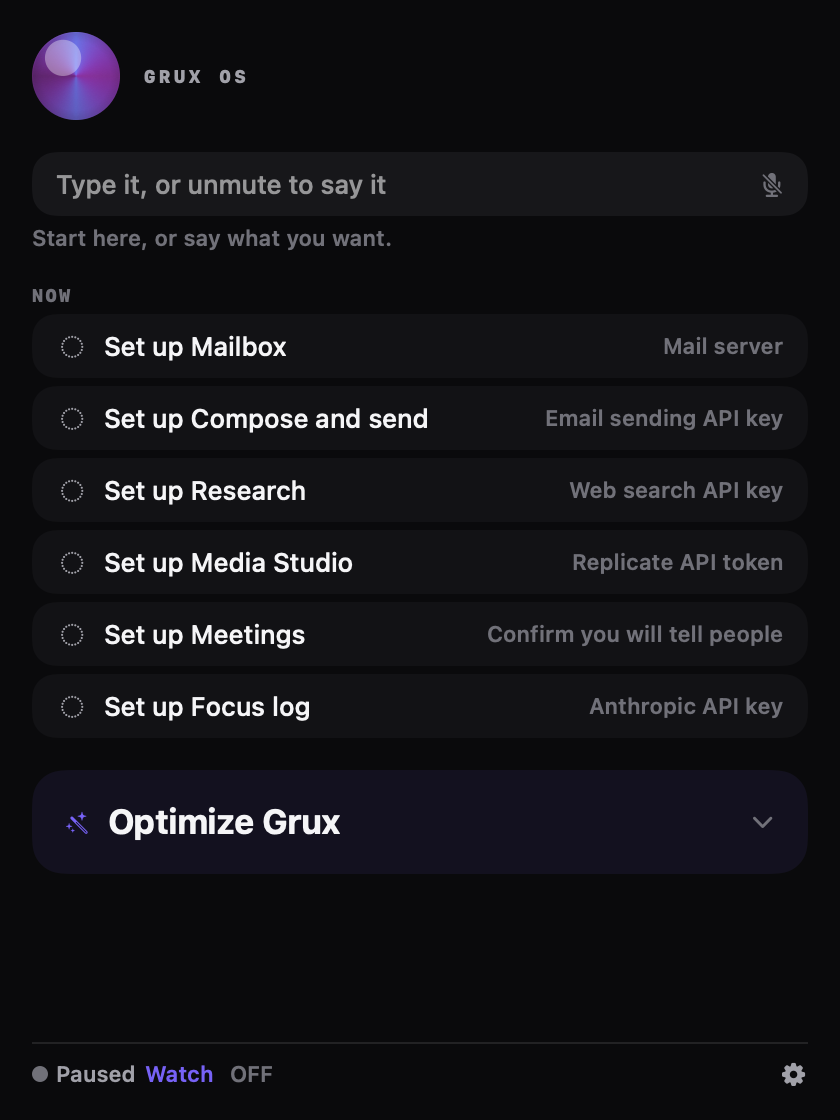
What is still being built sits behind the Labs door, badged once. Some of it is tooling built to run one small business, mine: Jax Command, Jax HQ, Meta Ads, Social, Feature Review, Self-Upgrade and Workflows. It ships because deleting it would misrepresent what you are downloading, not because you will ever open it.
Every feature, one line each, generated from the app's own feature registry. Or read the answers: what Grux is, a local AI assistant for macOS, which LLM your Mac can run, meeting notes without uploading audio, shell commands, safely, your mail and calendar, every permission it asks for, keeping secrets out of a prompt, free with no account, driving it from the terminal, open source AI agents for macOS, open source ChatGPT alternatives, Mac apps that use Ollama and changing it with Claude Code. New: what changed in 3.0, Grux vs Raycast AI, LM Studio, the Claude app and the ChatGPT app.
Local models
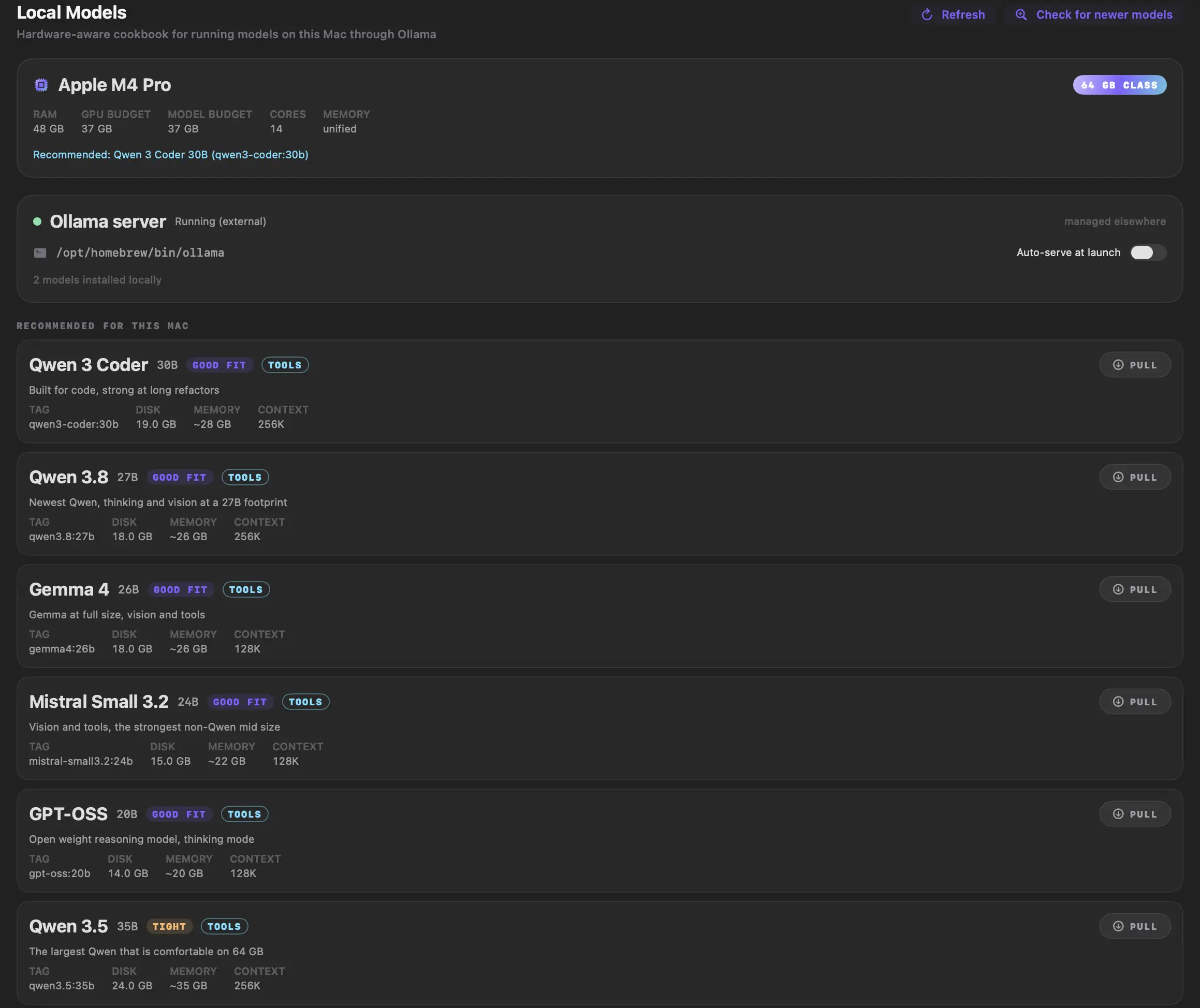
It reads this Mac and tells you what will run on it.
Point it at Ollama and the whole thing works with nothing leaving the machine. Local Models reads your actual hardware, budgets your actual memory, and rates each model against it before you download 17 GB to find out.
On the M4 Pro below: 48 GB of memory, 37 GB of it available to a model, Qwen 3 Coder 30B a good fit at 19.0 GB on disk, Qwen 3.5 35B marked tight at 24.0 GB, and one recommendation instead of a list. It will tell you what not to bother with.
What it costs
$0
There is no hosted anything to pay for, no account to make and no subscription. You pay your model provider directly, on your own account, at their prices. Grux never sits between you and the bill, because nothing is proxied through anything I run. Run a local model instead and the running cost is $0 as well.
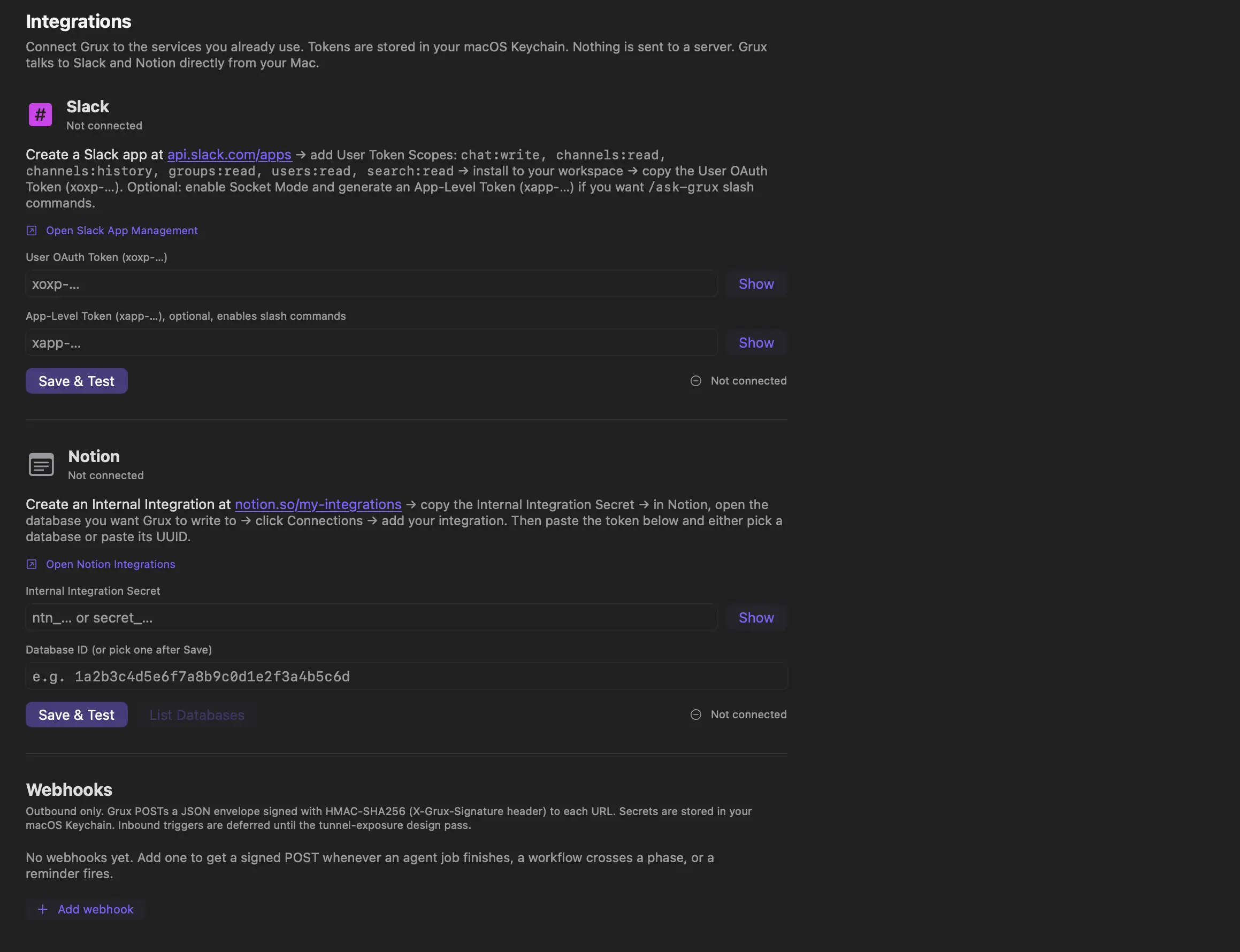
One key to start, not one key forever. Chat needs an Anthropic key and nothing else. Research also wants a Brave Search key, Mailbox wants your IMAP details, Compare wants Ollama running. The Now list names what a feature still needs, and a feature you never open never asks you for anything.
Approvals
It stops and asks.
Grux can run a shell command, which is the feature most likely to end badly, so it is the one with the most in front of it. Commands run against a denylist, inside folders you chose. Anything sensitive goes to Approvals and sits there until you press the button.
The model's only route to your disk is one Swift file. It reads at most 1 MB of a file, gets 10 calls a minute across reading and listing combined, and cannot touch .ssh, .aws, .gnupg, your Keychains, your Mail, your Messages or your browser profiles at all. Out of the box the folder it may read is empty, because you have not picked one yet.
Every attempt is one line in a plain text log on your own disk, refusals included:
{"ts":"2026-08-25T14:02:11Z","tool":"fs_read",
 "path":"~/.ssh/id_ed25519","outcome":"denied_denylist","bytes":0}
Permissions
Nine, and only five are ever required by anything.
Each is asked for the first time you open the feature that needs it, and refusing one disables that feature and nothing else.
| Permission | Required by | What saying no costs you |
|---|---|---|
| Microphone | Meetings | Talking to Chat instead of typing |
| System audio | Meetings | The other side of the call |
| Screen recording | Focus log | Screen context inside a chat turn |
| Calendar | Calendar | The agenda block on Today |
| Contacts | Contacts | Resolving a name in Chat |
| Automation | Nothing | Grux driving your other apps |
| Accessibility | Nothing | Knowing what you have highlighted |
| Notifications | Nothing | Being interrupted when a schedule fires |
| Full disk access | Nothing, anywhere | One Labs feature, and only that one |
One thing not to oversell. All nine are declared and shown to you during setup, but Grux does not yet check every one immediately before the system call that needs it. macOS still enforces it either way. What you may get is nothing back, rather than Grux explaining which permission was missing.
It is also not sandboxed, and the reason is boring: screen capture, AppleEvents and cross-app microphone access do not exist inside the App Sandbox. So the boundary is the Swift file above rather than the operating system, and your keys sit in the macOS Keychain and go to the provider they belong to. The app says that in its own interface, not just here.
Guardrails
The security layer is a separate package the app runs on.
The two jobs most likely to hurt you, keeping a credential out of a prompt and stopping
the agent following a hostile link, live in their own Swift package: 125 tests, zero
dependencies, MIT. Grux depends on it rather than carrying a copy, and
Package.resolved shows you that rather than me saying it.
It carries six published GitHub advisories against its own earlier releases, two critical, because six of the first nine tags failed to redact something. The tags stay resolvable, so anyone pinned to one gets told. That record is the reason to trust this one, and you can count them yourself: the advisories, the package.
Who made this
One person, in Detroit, since 2015.
I have been building and shipping my own products since 2015. Right now that is about a dozen of them, run by one person.
That is the reason this exists. Running a dozen small products alone was never bottlenecked on code. It was the hour a day spent moving between a mail client, a calendar, a terminal and four chat tabs that could not see any of it. So I built the assistant I actually wanted: one that reads the window I am already in, handles the mail, and takes the meeting notes.
It was a hobby project for six months. It is not a startup, there is no account, and there is nothing to buy. I am open sourcing it because it got useful enough to be worth somebody else's time, and because software that reads your screen and your mail should be readable back.
Expect rough edges. What is not finished sits behind the Labs door and says so. If something breaks, tell me and I will fix it.
Get it
Free, and the source is right there.
Bring an Anthropic key, or point it at Ollama and pay nobody at all. The licence text is in the app bundle.
And star it. That is the entire ask. There is no account to make, no email to hand over and nothing to buy, so a star is the only way anyone else finds out this exists.
- Requires
- macOS 14 or later, Apple silicon
- Signing
- Developer ID, notarized by Apple and stapled, so it opens without a right click
- Licence
- MIT licensed, and the whole tree is public
- Model
- Your own Anthropic key, or Ollama running locally and no key at all
There is no installer and no updater phoning home. Unzip it, drag it to Applications,
and open it. To check what you got before you run it:
spctl -a -vv /Applications/Grux.app should say accepted, and name
Notarized Developer ID as the source.